
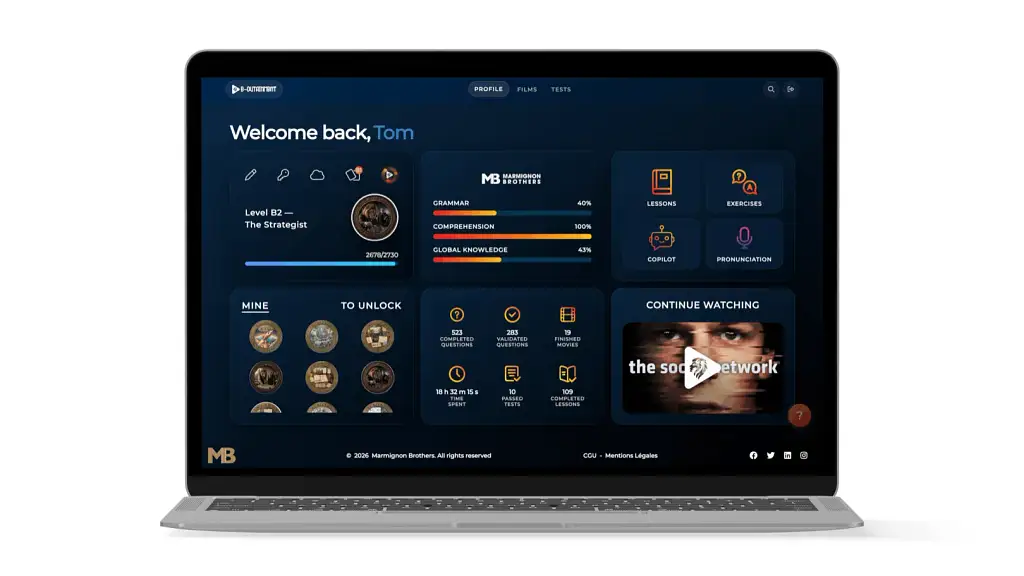
Streaming platforms have trained users to expect clarity, relevance and immediate continuity. Learning platforms can borrow those expectations, but only when interface choices are connected to pedagogy, feedback and meaningful next steps.
For years, digital learning platforms were designed like storage systems. A learner logged in, opened a catalog, selected a module and hoped the content would be useful. Streaming services changed those expectations. Today, users are accustomed to interfaces that remember where they stopped, organize large libraries without overwhelming them and suggest a relevant next step. The challenge for learning experience designers is not to copy entertainment interfaces blindly. It is to understand which streaming patterns reduce friction, and which learning-specific features turn attention into progress.
A premium learning experience begins with orientation
The first seconds after login matter. A learner should immediately understand three things: where they are, what they have already completed and what they can do next. A beautiful hero image is not enough. Premium learning UX creates a clear hierarchy between the main objective, the recommended action and the wider content library. This is especially important in media-based learning, where hundreds or thousands of videos can quickly become a source of indecision.
A strong home screen therefore behaves less like a course directory and more like a guided dashboard. “Continue learning” should be visible. Recommended activities should be connected to a reason. Progress should be readable without forcing the learner to open several menus. The interface reduces cognitive load before the lesson even begins.
Personalization is more than a recommendation carousel
Many platforms describe themselves as personalized because they display a row of recommended content. Real personalization goes further. It uses information about level, goals, completed activities, recurring errors and preferred formats to shape the next learning action. A beginner who struggles with listening needs a different recommendation from an advanced learner preparing a presentation.
The recommendation must also be explainable. “Because you watched this” may work for entertainment, but learning needs a more useful message: “Practice this dialogue because you missed three expressions in the previous activity”, or “Try this pronunciation exercise to consolidate today’s lesson.” When the learner understands why an activity appears, the platform feels supportive rather than arbitrary.
Content becomes valuable when it is connected to action
Media creates attention, emotion and context, but watching alone is not the same as learning. A platform must turn a scene, interview or lesson into a sequence of actions: notice, understand, retrieve, pronounce, reuse and review. This can be achieved through subtitles, contextual questions, flashcards, speaking prompts, short writing tasks and delayed revision.
The best media-based learning interfaces therefore preserve the pleasure of watching while adding carefully timed interactions. They avoid interrupting every few seconds, but they also prevent the learner from remaining passive. The objective is a rhythm in which the media provides meaning and the activities make that meaning reusable.
Continuity is the hidden feature behind engagement
A premium experience does not end when a video finishes. It creates continuity. The learner may be directed to a related vocabulary set, a shorter exercise at the same level or a new scene that reuses the same skill. This is where a learning platform can borrow the strongest idea from streaming: there should always be a meaningful next step.
However, learning continuity should not become endless consumption. The system must also signal completion, encourage reflection and make progress visible. A clear end-of-session summary can show what was practiced, what improved and what should be reviewed later. This transforms a sequence of clicks into a coherent learning journey.
Why responsive design matters for real learning habits
Learning rarely happens in a single environment. A user may begin on a laptop, review flashcards on a phone and complete a pronunciation activity on a tablet. Responsive design is therefore not only a technical requirement — it supports habit formation. Navigation, progress and saved activities should remain consistent across devices, while each screen prioritizes the actions that make sense in that context.
On mobile, the platform should favor short, focused interactions and make audio controls easy to reach. On desktop, it can display richer context, detailed feedback and longer activities. The experience should feel continuous without pretending that every device is used in the same way.
A practical example of media-rich learning UX
A useful example is e-dutainment, an English-learning platform built around films, series, video lessons, interactive exercises, pronunciation practice and AI-supported recommendations. Its value does not come from reproducing a streaming catalog. It comes from connecting audiovisual discovery to CEFR-aligned progression, contextual practice and visible follow-up. The media attracts attention; the learning design gives that attention a direction.
For learning experience designers, this distinction is essential. A premium platform is not the one with the most animations, the largest catalog or the most fashionable AI label. It is the one that helps a learner make a good decision at every stage of the journey.
Where this sits within learning experience design
The choices above belong to a wider discipline. Learning experience design, often shortened to LXD, is a human-centered approach to creating learning experiences. Unlike a top-down approach focused only on content delivery, the LXD process begins with learner needs, desired learning outcomes and the environment in which people learn. It combines instructional design, user experience design, design thinking and learning theory.
LXD and instructional design: what is the difference?
Instructional design traditionally structures objectives, content and assessment. Learning experience design extends that work by examining motivation, emotion, interaction and the complete learning process. Instructional designers and learning designers may use the same technologies, but an LX designer pays particular attention to friction, inclusive design, social learning and how the learner experiences each transition.
The learning experience design process
A practical LXD process includes research, definition of measurable goals, conceptualization, prototyping, testing and iteration. The designer identifies learning goals, selects tools, creates modules and checks whether the experience achieves the desired outcome. Real-time feedback, reflective observation, abstract conceptualization and active experimentation all support experiential learning.
LXD practices for corporate training
In corporate training, effective learning experiences are goal-oriented, accessible and connected to real work. Blended learning, self-paced modules, role-play and professional learning communities can all create engaging experiences. The fundamentals remain simple: understand the needs of learners, design effective practice, and measure whether knowledge and skills transfer to the job.
The design checklist for a truly personal platform
- Make the next useful action visible within seconds of login.
- Explain recommendations through goals, level or recent performance.
- Connect every media item to an active learning task.
- Preserve progress and continuity across mobile, tablet and desktop.
- Give the learner a sense of completion, not only more content.
Streaming UX can inspire digital learning, but pedagogy must remain the filter. When orientation, personalization, action and continuity work together, a media-based platform stops feeling like a catalog and starts feeling like a learning companion.